Unlucid AI image generator

A text-to-image generator creates a still picture from a written prompt. Describe an adult fictional character, a setting or a material study, then choose an image model in Studio. The result is a still; animation is a separate step.

Best for: A portrait, setting or material study without animation.

Sign in to explore the available models and review your Credits.

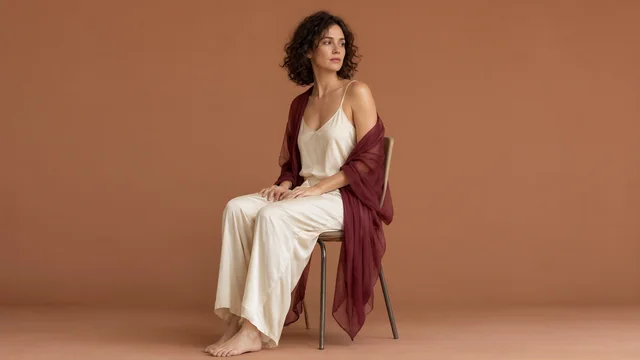
A fictional adult model seated in an opaque silk lounge set and chiffon outer wrap in a warm atelier.
Start with an adult fashion portrait

A layered outfit, a seated pose and space around the model give a campaign image a focused visual direction.

Original campaign image created with Qwen Image 2.1 through WaveSpeed. This is a commissioned example, not a result from your account.

Create a still first when composition is the decision.

Use this workflow to explore the subject, lighting and framing. To add movement to a finished still, open the separate image-to-video tool.

Already have a still? Add motion

Workflow reference: Hugging Face: Text-to-Image.

Input
A written description of the subject, composition, lighting and style.
Output
A still image. Inspect it at full size before using it.
Cost & access
Select a model in Studio to see its request estimate. Compare current pricing.
Content & rights
18+ only. Model content rules and input permissions apply. Read the content guidelines.

How to create an AI image from text

  1. Describe the subject and composition

    Name the subject and its position in the frame. Add lighting and style; use a clearly adult fictional character for a portrait.

  2. Choose the image setup

    Open Image Generation in Studio. Choose a model and output settings, then sign in and check the estimate before generating.

  3. Review the still and choose its next use

    Inspect faces, hands, reflections and small objects at full size. Find the result in History. If you want to animate it, confirm the rights for that use and continue in the separate Image to Video tool.

Find the look before you direct the motion.

Try a portrait, a set or a material detail. These are original writing examples: open one in Studio, edit it and review the estimate before generating.

Prompt structure: Subject + composition + lighting + visual style

Swipe to compare the scene briefs.

An adult character portrait

A simple composition makes lighting and expression easier to compare.

Editorial portrait of a clearly adult fictional woman wearing a dark tailored jacket, seated beside a large studio window. Soft side light, relaxed expression, natural skin texture, uncluttered warm-gray background, waist-up composition.

What to inspect Check the face, hands and clothing details. Decide whether the framing leaves room for the movement you may plan later.

Use this brief in Studio

A setting without a character

Establish the light and color of a scene before introducing a subject.

A quiet dressing room after a performance, a silk robe folded on a wooden chair, warm mirror lights reflected in dark glass, a single open curtain. Cinematic composition with a clear focal point and realistic material detail. No people.

What to inspect Check reflections, readable space and object edges. Keep only the visual details that help the next creative decision.

Use this brief in Studio

A close material study

Compare texture and light with fewer objects competing for attention.

Close-up still life of black silk and brushed silver jewelry on a warm stone surface. Soft directional light, visible fabric folds, one restrained highlight, shallow depth of field, editorial product photography.

What to inspect Inspect the texture and small objects at full size. A convincing thumbnail can hide malformed details.

Use this brief in Studio

Make the still answer one visual question.

A prompt edit you can evaluate

Original writing example, not a model comparison or recorded result.
BeforeA stylish adult portrait.
AfterWaist-up portrait of a clearly adult fictional character in a tailored jacket, beside a studio window. Soft side light and an uncluttered background.

Framing, clothing and light are concrete choices. Inspect those details at full size before deciding whether the style works.

Choose the composition before the style list

Decide whether you need a portrait, a wide scene or a close material study. Put the subject and framing first, then add a few details about light and texture. A clear composition is easier to revise than a list of competing aesthetics.

Leave space for a future action

If the still may become a video, plan room around the subject. A tight face crop and a walking scene need different opening frames. Consider where a hand, a turn or a camera move could go before generating the image.

Check the image beyond its thumbnail

Inspect hands, object edges, reflections and text-like marks at full size. For publishing or commercial use, also check the applicable terms and any third-party material. Visual quality alone does not establish permission to use a result.

AI image generator questions

Find more answers in Help & support.

Can I create adult-oriented AI images?

Adult-character prompts follow the selected image model's content rules. Use clearly adult subjects and describe the composition you want. The adult-creator focus does not guarantee that every explicit prompt will be accepted.

What can I use an AI-generated still for?

Explore a fictional adult character portrait, a scene's color palette, a lighting idea or a detailed material study. A still can be the final creative asset. If you plan to publish it, inspect the full-size result and confirm the applicable source, model and plan rights.

Can I upload and edit an existing image here?

This tool generates a new still from text. This page creates a new image from text. To transform an authorized reference, choose the separate Image to Image tool in Studio.

Which image sizes can I generate?

Use the output controls shown for the selected image model. Available dimensions and other options vary by setup. Check the current estimate before submitting; the site does not advertise one resolution or cost for every image.

Unlucid AI

Adults only · 18+

This site contains adult content. By entering, you confirm that you are at least 18 years old and of legal age to view adult content where you live.

Leave

We’ll remember your choice in this browser for 30 days.