Unlucid AI text to video

Unlucid AI text-to-video turns a written scene into a video. Describe the subject, setting and movement; no opening image is needed. Choose the model and check its content rules and credit estimate in Studio.

Best for: A new scene when you do not have an opening image.

Sign in to explore the available models and review your Credits.

Demo previews

Video gallery

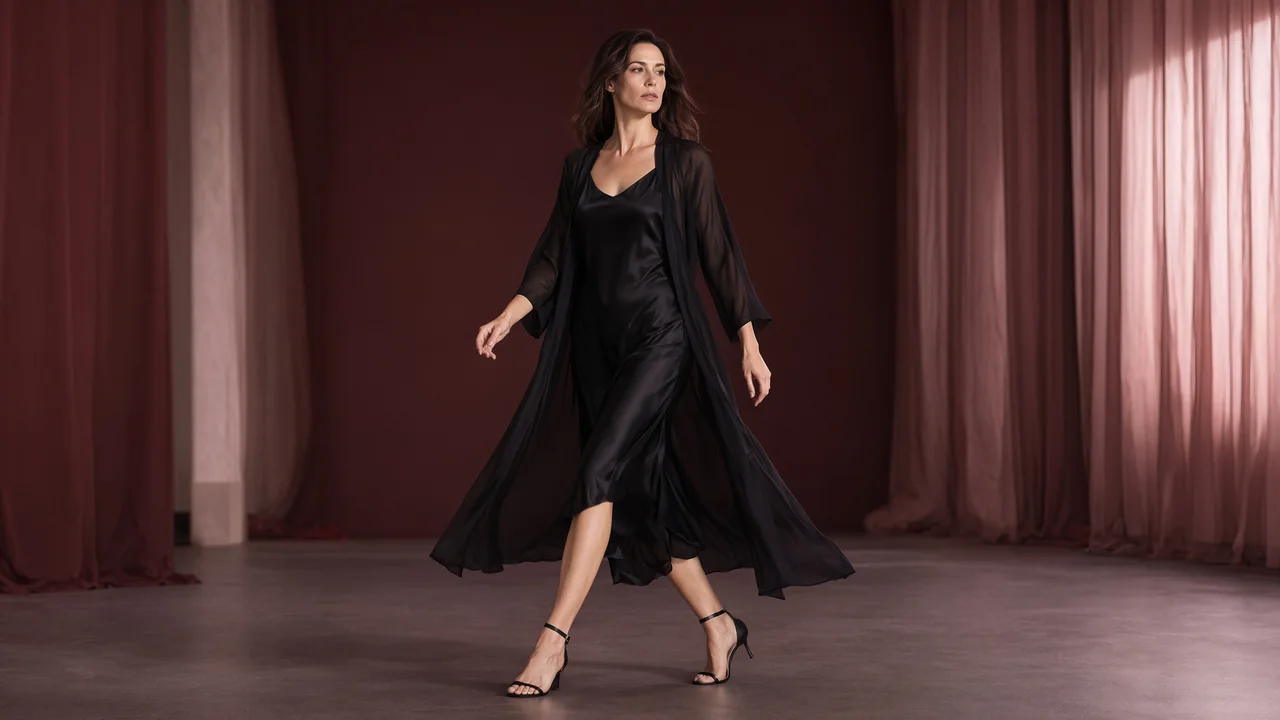
Adult fashion campaign samples, created with Wan 3.0 Spicy.

A fictional adult model walking in a chiffon outer robe over an opaque black slip dress in a burgundy studio.
Chiffon in motion

Source clip: 8 s · 1280 × 720. Sample file details.

Campaign videos generated with Wan 3.0 Spicy from Qwen Image 2.1 images. Create your own scene in Studio; results vary with the selected model and input.

Text or an image: choose the right starting point.

Words give you room to invent the subject and setting. If you need to start from a particular face, outfit or composition, use an image instead.

Compare image to video

Workflow reference: Hugging Face: Text-to-Video.

Input
A written scene: subject, setting, action and optional camera direction.
Output
A video clip. Choose its available output settings in Studio.
Cost & access
Select a model in Studio to see its request estimate. Compare current pricing.
Content & rights
18+ only. Model content rules and input permissions apply. Read the content guidelines.

How to create an AI video from text

  1. Write the subject and action

    Describe the subject, setting and one visible action. Add a camera direction, such as a steady shot or a slow push-in.

  2. Choose the setup and generate

    Open Text to Video in Studio. Choose the model and output settings, sign in and check the credit estimate before submitting.

  3. Watch the whole clip

    Review the result in History. Check the action and the end frame. Change one instruction for the next attempt so you can compare the difference.

Start with a prompt you can direct.

Choose an entrance, a fabric detail or a small turn. Each link opens an original writing brief in Studio for you to edit. It does not submit a request or recreate a published sample.

Prompt structure: Subject + setting + one action + camera direction

Swipe to compare the scene briefs.

A short character entrance

Use a simple walk to test pacing and framing before adding more action.

A clearly adult fictional performer in a tailored black suit walks three measured steps through a quiet backstage corridor, stops beside a warm practical light and looks toward the camera. A slow sideways camera move, one continuous shot.

What to inspect Check whether the walk finishes and the subject stays in frame. Look for changes in the face and hands.

Use this brief in Studio

A detail without a face

A fabric movement is a useful way to explore light and texture.

Close-up of an ivory satin curtain moving gently beside an open window at dusk. Warm light travels across the folds. The camera stays still; one slow movement with no scene change.

What to inspect Watch whether the light remains consistent and the fabric moves instead of the whole frame drifting.

Use this brief in Studio

One pose, one camera move

Keep the performance small while testing a closer camera position.

A clearly adult fictional fashion model wearing a fully buttoned silk shirt stands in a softly lit studio, turns slightly toward a window and holds the final pose. A gentle camera push-in. Keep the setting and lighting steady.

What to inspect Compare the start and end pose. Check that the camera move does not crop the subject unexpectedly.

Use this brief in Studio

Write a prompt that gives motion a clear job.

A prompt edit you can evaluate

Original writing example, not a model comparison or recorded result.
BeforeA cinematic character in a lounge.
AfterA clearly adult fictional performer sits in a lounge, turns toward the window and holds the pose. The camera stays still.

The revision names a visible action and a camera choice. You can judge whether the turn finishes instead of guessing what ‘cinematic’ should mean.

Put the action before the atmosphere

An adult character in a velvet lounge sets a look. Adding a slow head turn tells the model what should happen. Use clothing, light and setting to support the movement rather than burying it in adjectives.

Keep one camera instruction

A locked camera, a slow push-in and a sideways move produce different shots. Pick the one that matters to the scene. Several camera moves and cuts in one short request make the intended result harder to judge.

Check the ending as carefully as the opening

A strong first frame can develop drifting faces, hands or objects. Watch the beginning, middle and end before downloading or sharing. If the action breaks down, try a smaller movement on the next attempt.

Text-to-video questions

Find more answers in Help & support.

Can I create NSFW AI video from a text prompt?

Adult-oriented prompts are subject to the selected model’s content rules. Check those rules before submitting. “NSFW” or “uncensored” in a prompt cannot override them.

How do I write a useful text-to-video prompt?

Use a simple order: adult subject, setting, one action and camera direction. For example, describe a fictional adult performer walking into frame with a slow tracking shot. Add appearance and lighting details only when they help define that shot.

Which durations and resolutions can I choose?

Open Text to Video in Studio and select a model to see its duration, frame shape and other output controls. The options belong to that setup; a prompt cannot add a missing setting.

What does a text-to-video request cost?

The estimate beside Generate applies to the selected model and settings. Sign in to explore the available models and review your Credits. Another attempt uses its own estimate; Pricing explains additional credits and plans.

Unlucid AI

Adults only · 18+

This site contains adult content. By entering, you confirm that you are at least 18 years old and of legal age to view adult content where you live.

Leave

We’ll remember your choice in this browser for 30 days.